Disclosure: we make SofaDeck, one of the apps below. We've kept this to facts each project publishes about itself, checked on 3 October 2026. There are no star ratings or download counts here because we haven't measured them; check each store listing for current prices in your region.
"PC remote app" covers several different tools. Some put a trackpad on your phone, some mirror the whole screen, and some give you a grid of buttons. Choosing well mostly means knowing which of those you want — so this comparison is organised around what each app actually puts on the phone.
At a glance
| App | What the phone becomes | Phone needs | Computer | Cost |
|---|---|---|---|---|
| Unified Remote | Trackpad, keyboard and 100+ ready-made app remotes | App (iPhone, iPad, Android) | Windows, Mac, Linux, Raspberry Pi | Free version; paid full version (about $4.99–$5.99 once) |
| Remote Mouse | Trackpad, keyboard, gyroscope mouse, media and app panels | App (iPhone, iPad, Android) | Windows, Mac, Linux | Free download; some extras paid |
| KDE Connect | Trackpad and keyboard, media control, custom commands, file and clipboard sharing | App (Android most complete; iPhone available) | Linux, Windows, macOS | Free, open source |
| Chrome Remote Desktop | A view of the whole desktop | App or browser, Google account | Windows, Mac, Linux | Free |
| SofaDeck | Big labeled buttons and a voice remote | Just a browser (QR code + PIN) | Windows 10/11, macOS 11+ | Free (12 buttons); Pro $9.99 once |
Unified Remote
The broadest of the trackpad-style remotes. Beyond mouse and keyboard it ships remotes for Spotify, Netflix, media players, power (including Wake-on-LAN), a file browser and screen mirroring, and it can drive IR blasters for the TV. If you want one app with a remote for nearly every program, this is it. The cost of that breadth is a busier interface: you'll switch between remotes rather than keep one screen.
Remote Mouse
Simpler and more focused: trackpad with multi-touch gestures, keyboard with voice typing, a gyroscope "air mouse", media and presentation panels, power options and clipboard sync. A good pick if the trackpad is the main thing you'll use.
KDE Connect
The free, open-source choice, from the KDE community. It's a whole phone-to-computer bridge: trackpad and keyboard, pause/skip/volume for whatever is playing, run commands you define, send files and links, sync the clipboard and see phone notifications on the desktop. It's strongest on Linux and Android; Windows and macOS builds exist and are worth a try if you value open source.
Chrome Remote Desktop
Not a remote control in the couch sense — it shows the PC's actual screen on the phone, across the internet. It's the right tool when you're away from home or need to click something specific. From across the room it's fiddly: you're pinching and zooming a tiny copy of a screen you can already see. Our guide to controlling a PC from a phone covers remote desktop in more depth.
SofaDeck
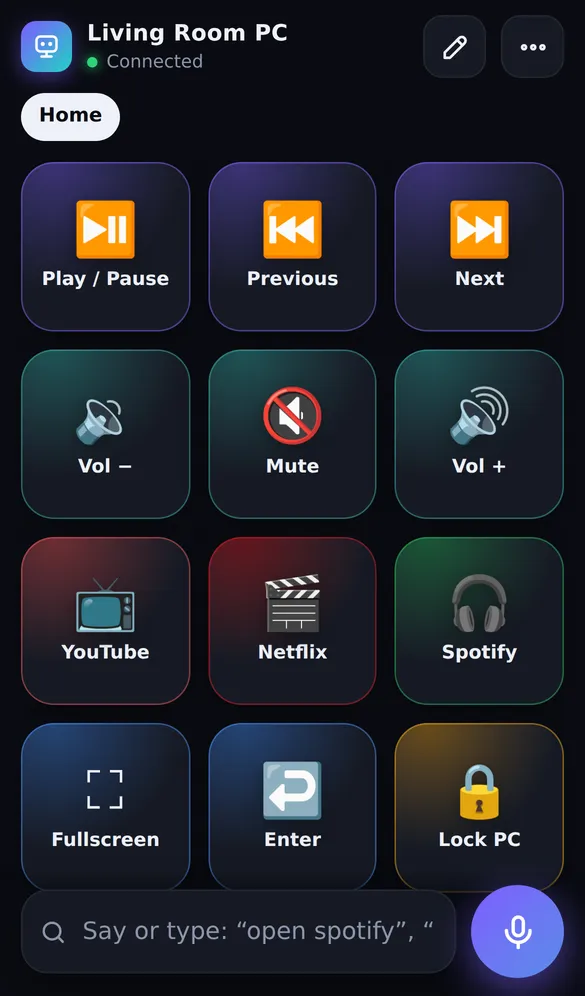
SofaDeck takes the button-deck approach: a page of large, labeled tiles that launch apps, files and websites, control media and volume, press keys and type text, plus a voice remote (open Spotify
, volume 30
, or any button's name). The phone needs no app — you scan a QR code and the deck opens in the browser — and it only works on your own network. It has no trackpad, which is a real limitation if you need to click arbitrary things. Pro adds unlimited pages, hotkey combos, macros and Steam, Epic and LaunchBox game launching.
Which should you choose?
- Away from home, or you need the screen: Chrome Remote Desktop.
- You want a phone trackpad: Remote Mouse for simplicity, Unified Remote for breadth, KDE Connect for free and open source.
- You repeat the same actions and want one tap or a voice command each, with nothing to install on the phone: SofaDeck.
- Streaming or a desk setup: see Stream Deck alternatives compared.
Dixon App Studio's blog has a shorter overview, how to use your phone as a PC remote, if you want the two-minute version.
Download for WindowsSources
Frequently asked questions
What is the best PC remote app?
It depends on the job. For seeing the whole screen from anywhere, Chrome Remote Desktop. For a phone trackpad and keyboard, Unified Remote, Remote Mouse or the free KDE Connect. For one-tap buttons and voice commands with nothing to install on the phone, SofaDeck. Many people use two.
Is there a free alternative to Unified Remote?
KDE Connect is free and open source and covers trackpad, keyboard, media control and custom commands, with the best support on Android. SofaDeck's free version is a button deck and voice remote rather than a trackpad. Unified Remote itself has a free version too.
Which PC remote apps work without installing an app on the phone?
SofaDeck runs in the phone's browser after a QR-code scan, so the phone needs no app. Unified Remote, Remote Mouse, KDE Connect and Chrome Remote Desktop all use a phone app.
Do PC remote apps work outside my home network?
Remote desktop tools do. Unified Remote, Remote Mouse, KDE Connect and SofaDeck are built for the same network; SofaDeck refuses connections from outside it on purpose.